> ## Documentation Index
> Fetch the complete documentation index at: https://codspeed.io/docs/llms.txt
> Use this file to discover all available pages before exploring further.
# Macro Runners on GitHub Actions
> Run the benchmark jobs of your GitHub Actions workflows on CodSpeed macro runners
[Macro runners](/docs/features/macro-runners) are bare-metal machines managed by
CodSpeed, for [walltime](/docs/instruments/walltime) measurements with low variance.
A GitHub-hosted runner shares its host with other tenants, so the walltime of a
benchmark moves from one run to the next for reasons unrelated to your code. A
macro runner is dedicated to your job for its whole duration.
On GitHub Actions, CodSpeed registers a macro runner in your organization for
each queued benchmark job and removes it once the job is done. Your side of it
is the `runs-on` label of the benchmark job.
## Prerequisites
* `CodSpeedHQ/action >= 3.1.0`.
* A GitHub organization. Registering a self-hosted runner on a repository rather
than on an organization needs the **Repository: Administration** permission,
which is too broad, so macro runners are not available on personal accounts.
Transfer the repository to an organization to use them.
* CodSpeed enabled on the repository.
## 1. Point the benchmark job at a macro runner
Replace `runs-on: ubuntu-latest` with the label of the
[runner](/docs/features/macro-runners#runners) you want, and set the `mode` of the
action to `walltime`:
```yaml highlight={4,16} theme={null}
jobs:
benchmarks:
name: Run benchmarks
runs-on: codspeed-macro-x64-ryzen-9950x-ubuntu-24-04
steps:
- uses: actions/checkout@v5
# ...
# Setup your environment here:
# - Configure your Python/Rust/Node version
# - Install your dependencies
# - Build your benchmarks (if using a compiled language)
# ...
- name: Run the benchmarks
uses: CodSpeedHQ/action@v5
with:
mode: walltime
run:
```
```yaml highlight={4,16} theme={null}
jobs:
benchmarks:
name: Run benchmarks
runs-on: codspeed-macro-arm64-graviton-ubuntu-22-04
steps:
- uses: actions/checkout@v5
# ...
# Setup your environment here:
# - Configure your Python/Rust/Node version
# - Install your dependencies
# - Build your benchmarks (if using a compiled language)
# ...
- name: Run the benchmarks
uses: CodSpeedHQ/action@v5
with:
mode: walltime
run:
```
Everything else about the workflow is unchanged, see
[the GitHub Actions guide](/docs/integrations/ci/github-actions#1-create-the-benchmarks-workflow).
**Caching**
A macro runner may not share the architecture of the GitHub-hosted runners your
other jobs use, so include `${{ runner.arch }}` in cache keys, or a job restores
artifacts built for another architecture:
```yaml {4} theme={null}
- uses: actions/cache@v4
with:
path: # insert your cache path here
key: pip-${{ hashFiles('pyproject.toml') }} # [!code --]
key: pip-${{ runner.arch }}-${{ hashFiles('pyproject.toml') }} # [!code ++]
```
## 2. Open a pull request
Open a pull request from the branch carrying the change: the benchmark job runs
on a macro runner and the pull request receives its performance report.
The walltime measurements of a run are comparable to the baseline recorded on
your default branch only if both ran on macro runners, so merge the change to
record a first baseline on a macro runner.
## Repository access
### Private repositories
Macro runners work with the private repositories of your organization without
further setup.
### Public repositories
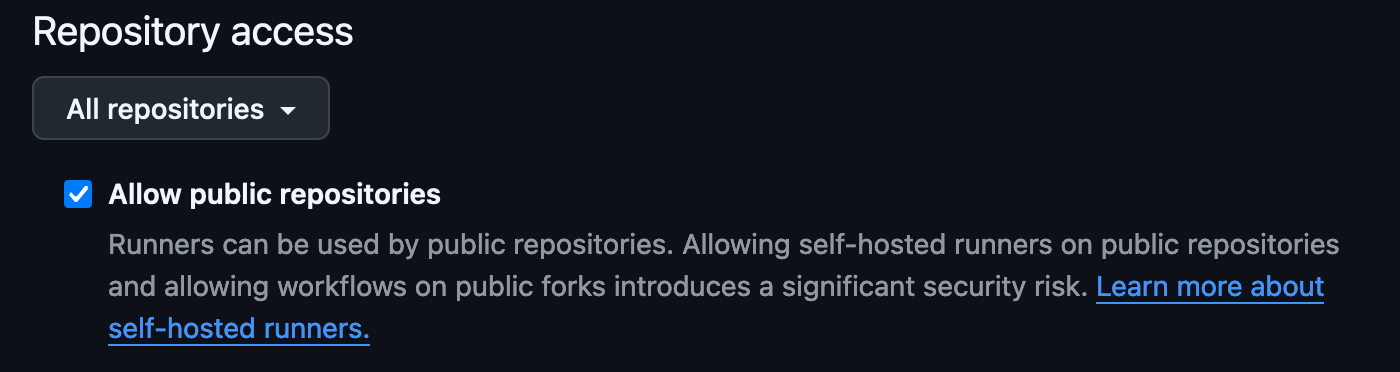
GitHub keeps self-hosted runners away from public repositories by default, since
a pull request from a fork could run code on them. To use macro runners on a
public repository, go to **Organization Settings** → **Actions** → **Runner
groups** → **Default** in GitHub and allow public repositories:
 A former label keeps working and lands on the same runner as the current one:
* `codspeed-macro-x86-ryzen-9950x-ubuntu-24-04` for
`codspeed-macro-x64-ryzen-9950x-ubuntu-24-04`.
* `codspeed-macro` for `codspeed-macro-arm64-graviton-ubuntu-22-04`, the label
the Graviton runner had before the machines were named individually.
## Next Steps
The runners, and what they are for
Measure and interpret walltime benchmarks
Authentication, parallel jobs and advanced options
Catch regressions on every pull request
This documentation is built and hosted on [Mintlify](https://mintlify.com), a developer documentation platform.
A former label keeps working and lands on the same runner as the current one:
* `codspeed-macro-x86-ryzen-9950x-ubuntu-24-04` for
`codspeed-macro-x64-ryzen-9950x-ubuntu-24-04`.
* `codspeed-macro` for `codspeed-macro-arm64-graviton-ubuntu-22-04`, the label
the Graviton runner had before the machines were named individually.
## Next Steps
The runners, and what they are for
Measure and interpret walltime benchmarks
Authentication, parallel jobs and advanced options
Catch regressions on every pull request
This documentation is built and hosted on [Mintlify](https://mintlify.com), a developer documentation platform.